Getting more from each token: How Copilot improves context handling and model routing
Ch01.068 Getting more from each token: How Copilot improves context handling and model routing
📊 Level ⭐ | 6.8KB |
entities/github-copilot-getting-more-from-each-token-how-copilot-improves-context-handlin.md
Getting more from each token: How Copilot improves context handling and model routing
来源: Getting more from each token: How Copilot improves context handling and model routing
Published Time: 2026-06-17T12:41:46-07:00
Markdown Content: How GitHub Copilot is making more of each session go toward useful work, so your credits go further.
June 17, 2026 | Updated June 18, 2026
|
8 minutes
As Copilot takes on more agentic work, from planning and editing to debugging, reviewing, and calling tools across longer sessions, efficiency means more than using fewer tokens. It means being smarter about how you use them.
Increasing efficiency starts with reducing what Copilot has to repeat from turn to turn, including context, tool definitions, and cached state. It continues with choosing the right model for the job. A quick explanation, a focused edit, and a complex multi-file change should not all be treated the same way.
We are working on both: improving the Copilot harness so more of each session goes toward the task itself, and expanding Auto so Copilot can pick the model that fits the work without asking developers to make that choice every time. This post focuses on harness improvements in GitHub Copilot for VS Code and on ongoing work to expand Auto across Copilot surfaces.
Increased prompt caching and deferred tools
In longer GitHub Copilot sessions in VS Code, the harness prepares a lot of recurring information for the model: instructions, repository context, conversation history, available tools, and the current state of the task. Some of that context is needed. Some of it can be cached, deferred, or loaded only when it becomes relevant.
Two improvements in GitHub Copilot for VS Code are doing most of the work here. Prompt caching helps Copilot reuse model state for repeated prompt prefixes instead of recomputing the same prefix on every request. Tool search lets the model load tool definitions on demand, instead of sending every full tool schema into context on every turn.
That matters more as agents use more tools. A session may need access to MCP tools, terminal commands, file operations, workspace search, and product-specific actions. Loading every full tool definition up front adds fixed cost to each turn, even when only a small number of tools are relevant to the task. With tool search, Copilot can keep the available toolset broad while sending less unnecessary tool schema into the model.
For a deeper technical look at the implementation, including prompt caching, cache-control breakpoints, provider-specific tool search, and how these changes work across long-running agentic sessions, read the VS Code technical deep dive.
Where GitHub Copilot auto model selection fits in
Auto answers a practical question: which model is the best fit for this task right now?
After your first prompt, Copilot uses task intent and current model health to choose a model that best fits the task. Different kinds of work, like quick explanations, focused edits, or multi-file changes, do not all benefit from the same level of reasoning, so Auto makes that call without requiring you to tune model settings.
In our evaluations, no single model consistently performed best across tasks. In many cases, a more efficient model reached the same outcome, while stronger models mattered most when the task required deeper reasoning. Auto learns where stronger reasoning improves the result. It routes up when the task demands it and stays more efficient when it does not. The goal is not to trade quality for cost, but to use the model that best fits the work.
How Auto selects the right model
Auto combines two signals: what model is healthy and available right now, and what kind of work Copilot is being asked to do.
- Real-time model health: a dynamic engine tracks model availability, utilization, speed, error rates, and cost. A model may be capable of handling a task, but that does not mean it is the best choice at that moment. Auto takes current system conditions into account so Copilot can route to a model that is both capable and ready to respond.
- Task-aware routing with HyDRA: a routing model that considers factors like reasoning depth, code complexity, debugging difficulty, and tool orchestration needs. HyDRA identifies models that can meet the quality bar for the task, then chooses the best fit among them.
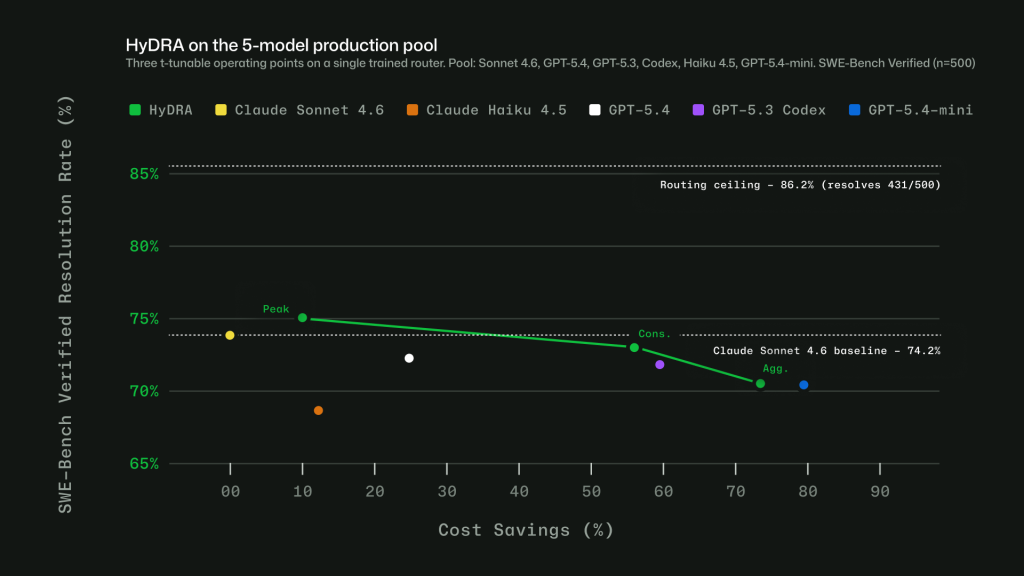
Figure 1: Three HyDRA operating points illustrate tunability: (Peak) exceeds Sonnet at 12.9% savings; (Agg.) balances quality for 72.5% savings.
![Image 2: Chart showing quality and cost tradeoffs of HyDRA and other published research and commercial routers using SWEBench benchmarks. HyDRA (Cons.) ties OpenRouter Auto on resolution rate (70.8%) at 3.3x the savings. HyDRA (Aggr.) outperforms both Azure Foundry operat
→ 原文存档